Welcome! This forum has a treasure trove of great info – Scouters helping Scouters! Just a heads up, though - all content, information, and opinions shared on this forum are those of the author, not the BSA.
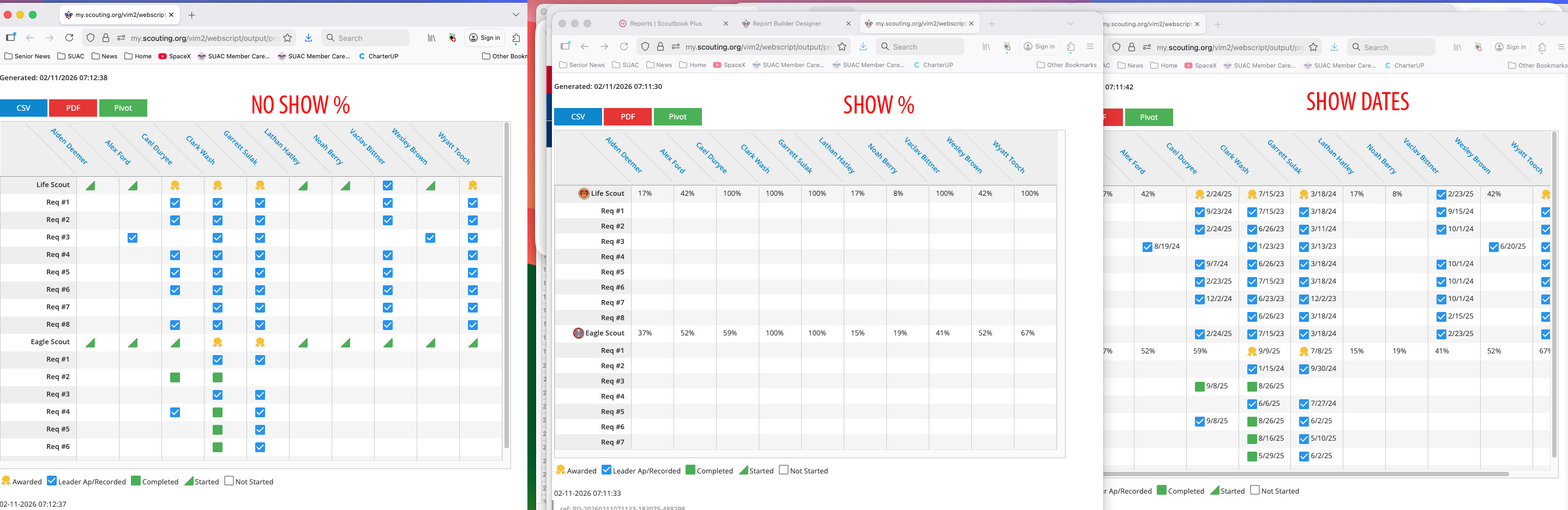
Is anyone else having issues with the custom report created in ReportBuilder?
Specifically when asking the report to show complete status without dates, there’s no green or blue boxes.
However, as soon as I select “Show Dates” checkbox in the ReportBuilder Settings, the completion boxes appear. Is there a way to see which requirements are completed without having it display dates (I’m after a cleaner and concise report).
If it helps, I’m attaching a screen capture of the settings in my Custom Report
(“Show Dates” is unchecked to help replicate the issue)