
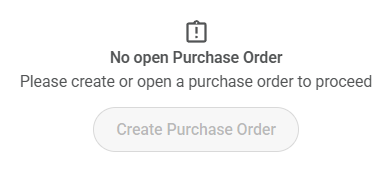
Immediately after adding items to a purchase order in the “to purchase” tab, the items disappear from the “to purchase” list, as if they’ve been added to a purchase order. However, no open (or closed, for that matter) purchase order is listed below. It simply says, “No open Purchase Order - Please create or open a purchase order to proceed.” I did manage to hunt down the open purchase order in the “to award”, and it contains the expected items and is still open as expected, but still not showing under open purchase orders section of the “to purchase” tab, even after refresh, or checking on another device. A leader from another unit is experiencing the same thing.
@GwendyDarling - i have noticed the same with a PO i made the other day
Try a hard refresh or incognito window and let us know if the PO appears.
@edavignon - I tried a private session in firefox, a session in chrome and the po from the other day does does not get listed.. Just the No Open Purchase Order in step2
The developers are investigating.
Watch Scoutbook - Scoutbook Plus Change Log - Scouting Forums for an announcement of a fix.
Initially used Chrome on my PC. Still no purchase order shown after trying Chrome on my Android, Chrome incognito window on PC, and MS Edge on PC.
I am also having this same issue, Tried Edge, Edge (in private mode) Safari, nothing works
This is a known issue. The developers have identified the issue.
Watch Scoutbook - Scoutbook Plus Change Log - Scouting Forums for an announcement of a fix.
I am having this same issue and can’t find the purchase order list anywhere and the items all disappeared as if they have been purchased. I was able to find a “to be awarded” report that seems to have everything but how do I get the purchase order that I need to take to the scout shop in order to purchase my items?
I’m having the same issue, and it’s causing some anxiety as we’re getting ready for a Court of Honor with a lot of prep work to do with all of the MBs and awards after summer camps. However, I’ve found a workaround – those MBs and awards still appear in the “To Award” report and in each row, there is a PO number link. If you click on the PO number link, it will show you the PO, even though the PO doesn’t show up in the Open or Closed PO’s section of the To Purchase report.
From the “to award” list, click directly on the purchase order number, and the entire purchase order will pull up. Just a back door workaround until the front door is fixed. 
Gwendy, thank you for this. Helped IMMENSELY>
You are a hero! This should be pinned and communicated broadly until a fix is in place. This workaround will alleviate panic.
That helps!
Not sure if you can add additional items to that PO in that screen.
It doesn’t look like there is. And trying to add additional items in the “to purchase” menu just creates a new PO (I checked). However, if need be, you can remove items from a PO and start over. ¯\_(ツ)_/¯
I am having the same issue. We have a COH in a week and I can’t get a PO for the 50+ items I added yesterday. So I can not purchase them from the scoutstore. Ugh
Thanks it worked. I hope it gets fixed soon.
Hooray, it’s working now! THANK YOU, developers, for your prompt fix! We appreciate you!
I’m having the same issue as an Advancement Chair - I can finally find the PO I created (with the “to award” work around) but cannot print it or get a PDF to populate. I just get a white screen. I’ve used safari, chrome, incognito in both, cleared the caches, and no change.
I am also unable to access Scout BSA History reports. I’m don’t know what else I am unable to access.


