
When trying to update merit badges in scoutbook, when I tried to open the camping merit badges it errors out so I am not able to add requirements completed.
@ThomasMendall is this in SB+? What Scout member ID (no names)?
I have been having the same issue!
Leaders need to use Scoutbook Plus (https://advancements.scouting.org) for Merit Badges. Legacy Scoutbook is only for Merit Badge counselors.
As a merit badge counselor as well as our troops Advancement Coordinator, I am still unable to add completed requirements into Scoutbook Legacy
@KaseyKamp- well as committee chair and MBC I know it works for me if I use this menu:
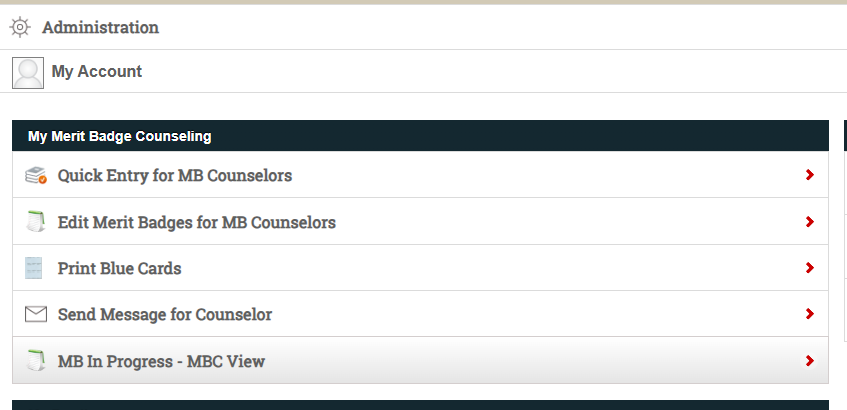
This uses the path that Stephen noted, but only for badges for which you can counsel.
This uses SB+, as noted by Ed. Make sure you’re assigned the functional role of Unit Advancement Chair in my.scouting by one of your Unit Key 3, not just in classic Scoutbook, as SB+ relies primarily on positions/roles in my.scouting for permissions.
Yes in scoutbook for Thomas mendall scout
@ThomasMendall- hum.. not following

@ThomasMendall- you have to use the merit badge menu that is posted
That is a known issue caused by individual who are MBCs and unit leaders. You will need to use Scoutbook Plus (https://advancements.scouting.org)
Watch Scoutbook - Scoutbook Plus Change Log - Scouting Forums for an announcement of a fix.
Sadly that does not currently work either. Are they working on fixing the issue?
Thank you for your assistance… Really thought I was going crazy!
Are you trying to enter it for yourself or a scout with the same name as you?


