
Sending more information about the issue I asked about on 11/24. It was closed, but last I had heard was on 11/26 when Donavan asked to screen share, and then we never did that, but I’m still seeing this issue.
Trying to send an email to just leaders in Scoutbook Plus. I know this has worked before, so something must have changed.
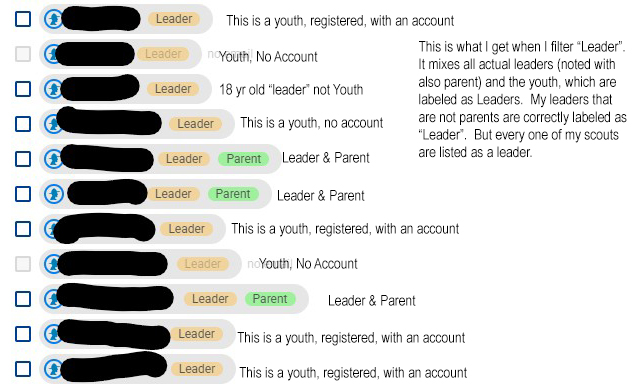
When I filter by “Leader”, it brings up ALL of my Scouts and labels them as “Leaders” (Scout leaders also appear - most as “parents” too.
Without any filters, I also noticed that my Scouts are duplicated - ie before I think they were only appearing below their Parent, and now they are appearing by themselves as “Leader” and then also under their parents. I also have a “- - “ Parent header with all the parent/leaders listed as “no guardian with email”
Sending redacted screenshots to show what I am still seeing when using Messaging.
I have removed all Youth Advancement and calendar permissions and this is still what I am seeing.
Thanks,
Megan

This is a scout duplicated as a leader and under parent screenshot.


