Good Morning,
I am a key three member of a Pack and was assigning roles/permissions for my leaders. I have a leader who is currently assigned as an assistant cubmaster and when he logs into his account, he has no access to edit, approve or award advancement.
I checked the permissions under the “advancement” section and here is what I observed:
- When scrolling through the list of leaders without using any filtering options, I see his name and that he is currently not checked off for any of the three permissions (edit, approve or award)
- When I select to “filter by positions –> asst cubmaster” I then see the same leader, along with the other two asst cubmasters, and all three have the blue checkmarks for “edit, award, approve” next to their names as it should be
- I did not select the check marks at any time. I simply changed the manner in which the advancements sections was filtered based on position.
- When there is no filtering selected, and the same leader shows no checkmarks, I only see his name with the no checks…almost as if the filtering is revealing a hidden entry or something. I would expect a filter to remove non relevant entries…not add an entry not present in the full list
The last thing I attempted was to go back to the unfiltered list and checkmark that leaders permissions for “edit, award, approve” and click “apply changes”. This is the error I receive:
position already exists in the same organization for given person - positionId: 792 - personId: 45826088 - organizationGuid: 569612FD-8360-4F5B-B48D-F22476C1C158
The leader in question is #140286969
Thank you, any help you can provide would be greatly appreciated.
@TravisDuke - is this the filter you are noting ?
Yes sir.
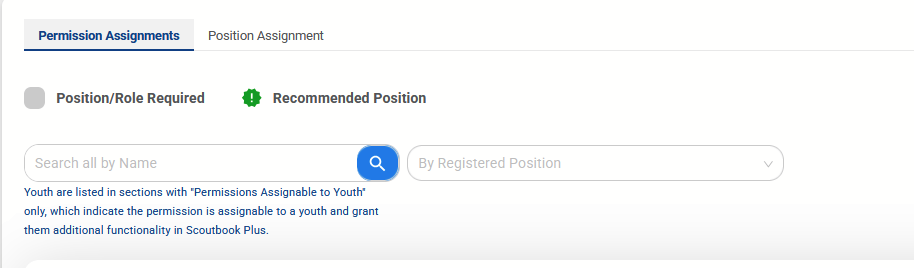
If I don’t make any selections, that section defaults to showing all registered leaders and he is shown with no permissions checked.
Once I select the drop down “by registered position” and “asst cubmaster” he shows up, along with the other two Asst CM’s, and all three of them have full permissions checked.
Thank you.
@TravisDuke - are all of them listed as ACM in my.scouting.org ?
First test would be an incognito window as it kind of sounds like cache if the filter does find him
I just verified. All three are listed as ACM in my.scouting.org AND on advancements.scouting.org/
I will ask him to do this and report back.
Last night I had him log out and log back into the account. You’re suggesting he log in from an incognito window entirely?
Are there browser compatibility issues that you are aware of at all? Should I have him utilize chrome, edge, firefox….???
@TravisDuke I was saying You do Incognito as it is not consistent on your view. Browser should not matter although it seems FF and chrome are better
ACM by default have no advancement permissions - they have Calendar and Activity. If you want them to do advancement it has to be added.
Ok.
But the issue is still the same. It is showing that those permissions were assigned to all the ACM’s when i filter advancements by position.
When I don’t filter, and it shows all leaders, and he doesn’t have them. When I select to add them on the unfiltered list, it gives the error I pasted which reads to me like the database is seeing him already assigned those permissions.
But at the end of the day, the functionality for him isn’t there when he logs into his account.
@TravisDuke - the error says POSITION not permission which would seem to indicate multiple positions are being attempted.
I would check position manager for that occurrence
I took some screenshots to help illustrate the way things look on my end of things.
I checked on position manager (my.scouting) and on position assignment (advancements.scouting) and he is appropriately placed in the ACM role for both.
Additionally, all the other 2 ACM’s are showing full privileges all the time. The leader in question, Dave, is only showing full permissions when I filter out the advancements by the position of ACM.
This is the default view, showing no permissions to approve/edit. There is no filtering by position or any other metric. The list is comprised of all 21 of our registered leaders, with varying permissions. The other 2 ACM’s have full permissions in this view as well.
This is the view AFTER I select the filter option “Assistant Cubmaster” and it only shows the 3 leaders who are registered in that role. It shows ALL three ACM’s, including Dave, with a full set of permissions.
Position Manager in my.scouting.org showing all three ACM’s in their roles. No apparent issues here.
This is from the Position Assignment tab in advancements.scouting.org…also shows all three ACM’s in their respective roles. No apparent issues here either.
My apologies if I am looking in the wrong area. If you meant somewhere else, please let me know. I am just having a very difficult time understanding why the “advancements” permissions section is showing two different entries for the same leader, depending on how I filter the names. I am looking at the list under each section as if it is a database, and if that is correct, when I filter that field by position I shouldn’t be seeing new and unique entries…I should just be excluding all non applicable entries.
Thank you for all the help.
@TravisDuke
I see some strange things when I look at the ACM’s record in Akela. We will need to send this to the developers for investigation.
Anything back from the developers? Thanks!
@TravisDuke you can watch the change log for updates on issues - that is the place they are posted.
Thanks.
I looked and they referenced correcting something in the advancements tab today. Still have the same issue with that particular leader however.