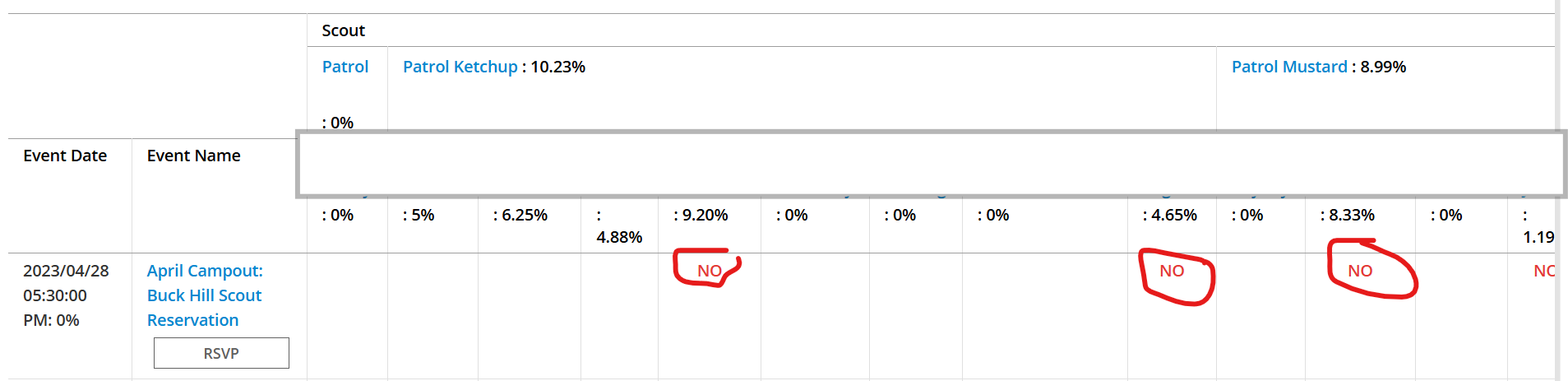
The scoutbook attendance log looks like this with all Nos and zero attendance:
But I know that scouts have attended some this event. When I look at event details in the calendar there are scouts that have attendance = Yes. In this case, for the Buck Hill camp-out, 10 scouts responded yes.
Why are they showing up as No on the attendance history report? If the Yeses and Nos in the Activity are actually tracking something else, can you let me know what that is? Or better yet, is there a way for me to output the event detail data so that I can see which scouts replied yes or no for event attendance across several events so that I don’t need to go into every event to see attendance?
The “colored dots” (green, red, yellow) indicate RSVP status, not attendance. The slider next to each name is the “checkmark” for actually attending. That’s what feeds the attendance report.
Are you trying to get RSVP status (i.e. how many yes, no, maybe, no response) so you have a planning headcount for the event? I think there’s an RSVP status report for that. Or are you trying to find out who actually showed-up afterwards? That’s the attendance report.
Scouts can’t mark their own attendance, generally-speaking. They can RSVP (i.e. say what the plan is regarding attendance), but someone with calendar editing permissions has to actually take attendance (could be a scouter or a scout who’s assigned the relevant permissions, like the troop scribe) for it to appear in the attendance report.
Thanks. That explains what I have been seeing. I have another follow-on question….
- We have a service event that runs for 6 hours, from 8am to 2pm.
- A scout shows up at 10am and works until 2pm. If their attendance is checked off, does that mean they get 6 hours of service credit or is it possible to set hours of service on a per scout basis (and how do you do this?).
Thanks!
@StephanieGellar- you would use the individual tab for that
You can make individual adjustments in the Activity Logs.
Thanks for the quick response. I will need to try this and see how it works.
So, I tried it out and here is what happened:
-
I chose a past event and went into Edit Event and down to add camping activity of 2 nights.
-
The event had 8 RSVPs and 1 confirmed attendance, but what showed up when I did a Group camping activity was the 8 scouts that had RSVPed Yes and 26 adults who had not RSVPed at all. So, now I need to remove individuals from the activity.
Adding all invited people to the activities seems like a bug - shouldn’t the activity only get credited for the people who are confirmed as attended (ideally) or at least only credit those that RSVP Yes? Am I missing a setting or something? I don’t want to add everyone individually as it is far more common that everyone who attended the event has done the same activity quantity.
Thanks for all of the help with this. We are starting to see how this tool can really provide benefit and appreciate the support in sorting out the details!
@StephanieGellar
Changing the list of folks automatically added to an activity to those who attended, or if attendance was not taken, to those who RSVPed YES, followed by all if RSVP disabled is in the backlog. We do not know when it will be scheduled for development.
Watch Scoutbook - Scoutbook Plus Change Log - Scouting Forums for an announcement of a fix.
Is there a way to affect priority of this functionality? Is there a recommended workaround? For example, if we reduce the invitees (since we are talking about building up activity logs from past events), will that reduce the activity list?
@StephanieGellar - if you are looking at populating past events with linked logs I wold limit the invitees to those who actually attended. For new events I will remove folks when I add the log to the event. its fairly easy and does not take a great deal of time to do that.
Sounds good. Thanks for your help!