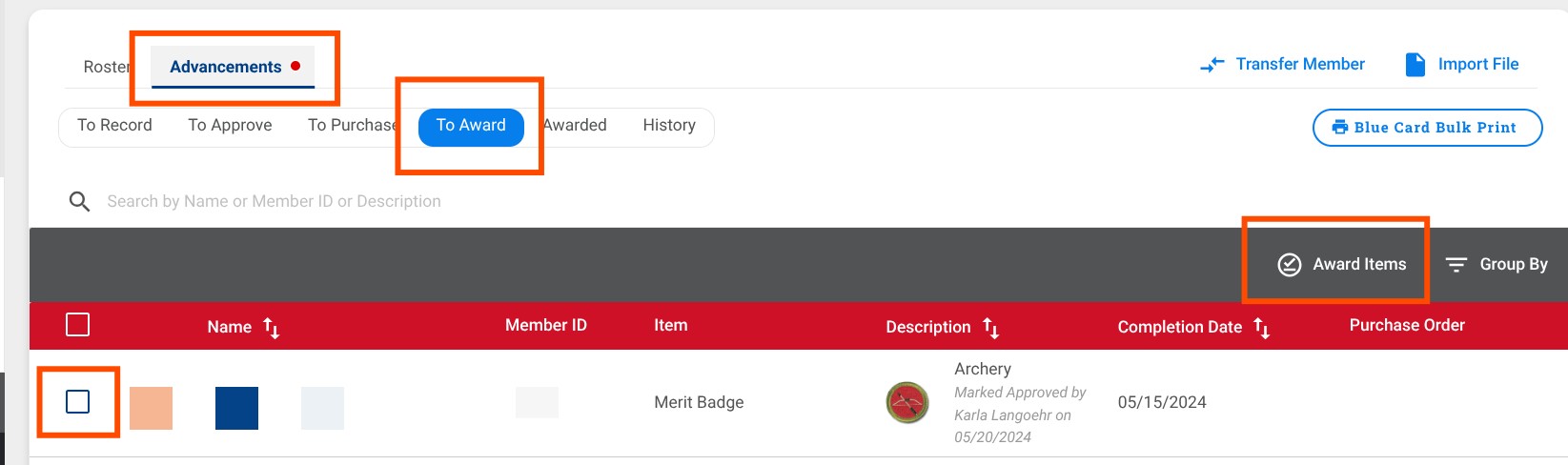
I am seeking clarification or a bug fix regarding the behavior of the “Award Items” feature in Scoutbook Plus. I have noticed a discrepancy in how audit history is handled depending on where the “Awarded” status is toggled.
The Issue: When marking items as “Awarded” using the batch process, the system overwrites the “Completed By” and “Approved By” fields with the name of the person marking the item as Awarded—even if those fields were already populated by a different user (e.g., a Merit Badge Counselor or Scoutmaster).
Steps to Reproduce:
-
Navigate to Advancements > To Award.
-
Select a Rank or Merit Badge for a Scout (where “Completed” and “Approved” are already signed by a different user).
-
Click “Award Items”.
-
Check the Scout’s individual record: the “Completed By” and “Approved By” signatures have changed to the current user (dates seem to not change).
Comparison:
-
Individual Roster Method: Toggling “Awarded” directly in a Scout’s roster correctly updates only that field.
-
Batch “To Award” Method: This triggers a full record refresh that “grabs” the current user’s name for all three milestones.
Questions for the Community/Developers:
-
Is this a known synchronization bug within the Scoutbook Plus interface?
-
How can I revert these records to their previous state in bulk? Is there an audit log or “revert” function that restores the original “Approved By” signatures, or must this be corrected manually for every single merit badge and rank?
-
If manual correction is the only way, is there a suggested report I can run to identify which records were changed during this session?
User Role: Advancement Coordinator
Unit Type: Troop
Screenshots: