Please Help this one, we are all stuck!
Scoutbook Plus records that I am the Lion Guide/Den leader for myself and our unit leader. However, when I go to my Roster and try to quick-add adventure completion, all named are grayed out and listed under “Not Eligible”.
Note, when I use the app it says under my positions “Lion Den Leader”, but when i click on the lion den - it says the group has no leader.
Does anyone know how I can quick-add adventures, or why the kids are all grayed out as not eligible?
@JackieJames your position in the den is not approved cause you added it yourself - a unit admin needs to go into Legacy and approve the position
My leader has also added it, and sees me there with a check mark. Is there something here that says I added it myself? (I have tried that too!)
I assume you already checked my.scouting to make sure that your registered position matches (Den Leader) and that your Scouting America Member ID matches between your registered position and what you see when you login at SB/SB+?
I suspect Donovan looked at that already, but figured I’d mention the low-hanging fruit that can be checked on the user end of things.
ETA:
- Do you show as a Den Admin in SB/SB+ as well? I wonder if that’s the hang-up.
- Sometimes it takes time for the positions to sync up between SB and SB+. How long ago did the Admin mark your DL position in SB approved?
@JackieJames it is simple - the DL that (as you can see here) are assigned to a den - that you added - have the NO which means they are not approved positions.
This is very helpful. According to my Den Admin/Pack leader - she sees me as an approved den leader. What’s the best way to fix it? Remove all my current positions and just have her start fresh?
@JackieJames- a pack admin or key 3 would need to approve the position.
Where does she see the approval request? She says its showing all approved on her end.
@JackieJames- the key 3 should go to the unit roster in classic scoutbook, the locate and click on your name then your positions and look for this:
The position approved check box is what is needed. This MUST be a unit admin not a den admin
Looking at Donovan’s screenshot, it looks like there are multiple active DL and Lion DL positions in the system.
Lion DL added 10/6 ended 10/7 via Akela sync and approved, but no den assignment (first line)
Den Admin added 10/12 by you and not approved, assigned to Den zero? (second line)
Den Leaded added 1012 by you and not approved, assigned to Den zero? (third line)
Lion DL added 10/7 by Akela sync and approved, but no den assignment (fourth line)
Maybe your pack admin is seeing the Lion DL position as approved, but it’s not assigned to a den?
That last one though from 10/7, Lion Den Leader with a YES - shouldn’t that be the right one that’s already set? I”m so sorry to be a pain, trying to make sure I can help out my pack lead easily.
@JackieJames- that is the registered position but it is not assigned to a den.
Is Lion DL still the right registered position, though? I thought DL covered Lions, Wolves and Bears, Tiger DL covered Tigers and Webelos DL covered Webelos & AoL dens. Did Lion DL get resurrected?
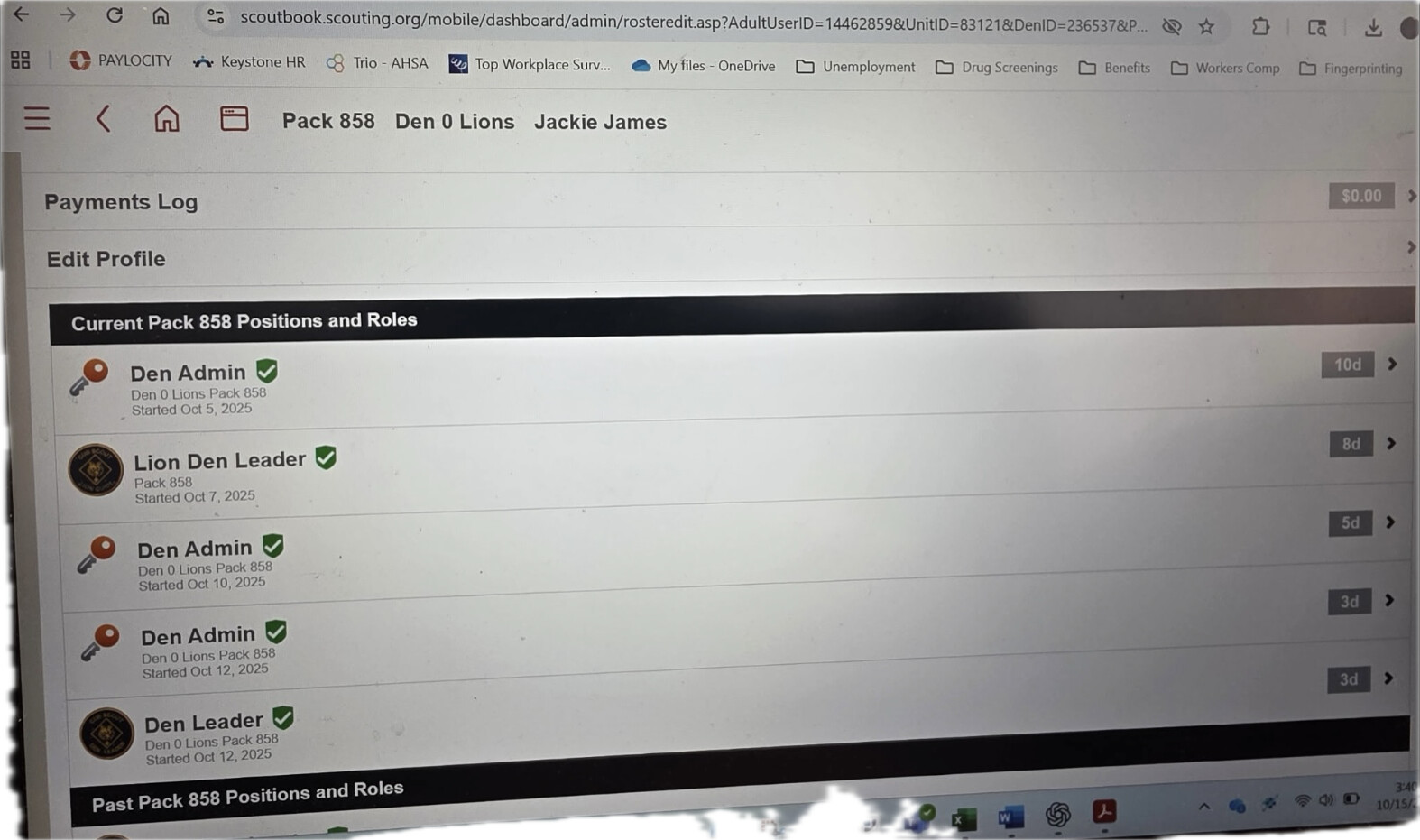
Here’s what my pack lead sees…..what are we missing??
This is what my pack lead sees… what are we missing?
Well yes -
now someone went in and approved the positions. That should resolve it
@JackieJames - i would only add that a singular den admin position is all that is needed