
I get the following error message about 98% of the time when entering both merit badges and rank advancements: “There was an error updating one or more requirements, try again later. This advancement should not be updated.” However, when I check the specific scout entry in the troop roster, the merit badge and/or rank has, in fact, been recorded. It has become standard operating procedure for me to 1. enter the merit badge or advancement, 2. wait for the error message, 3. double check the individual scout record to verify that it was, in fact, recorded. This makes everything take longer. Is anyone else having this issue? Can it be fixed so I can just enter something and be assured that it was recorded correctly? Thank you!
Can you outline the specific steps that you are taking to mark rank and MB advancement records? Are you importing or manually inputting? Scout-by-scout, or using Quick Entry? Using SB+ (advancements.scouting) vs classic SB (scoutbook.scouting)? It’s hard for the SUAC to identify what the issue might be without some additional details.
Are the entries always (or typically) being made on the same day? For example, I’ve noticed issues in the past with updating things on Mondays (when our troop has meetings) because it seems like everyone else is trying to update things at the same time and the system is lagging (at best) and sometimes entirely nonresponsive.
All good questions - I’ll try to get them all answered!
- I am using Scoutbook Plus (advancements.scouting)
- I am manually entering each item, scout by scout
- I don’t think I’ve been entering things on any specific day of the week, or noticed any pattern with that, but I’ll pay more attention to that.
- I’m using the following steps to enter each merit badge and or rank advancement:
- From the roster page, I’m clicking on “Advancements” and then either “Go to Merit Badges” or “Go to Ranks”
- Then I select the merit badge or rank from the drop down box, and the version. The version is almost always the current version.
- Then I select one scout from the list and then check the requirements. Most of the time I am using “select all” when checking the requirements.
- I add the completion date at the bottom and check the “approved” box.
- Then I get the summary screen and approve that. Then the system thinks about it for awhile and then I get the error message above.
- Even when I get the error message, I go back to the roster and select the scout and view the Youth Profile. 9 times out of 10, the merit badge or rank advancement shows up as recorded and approved, despite the previous error message.
I hope that was helpful. Let me know if I can provide any more info that would help fix this problem. Thanks!
@PatriciaHannel can you post an image of the error?
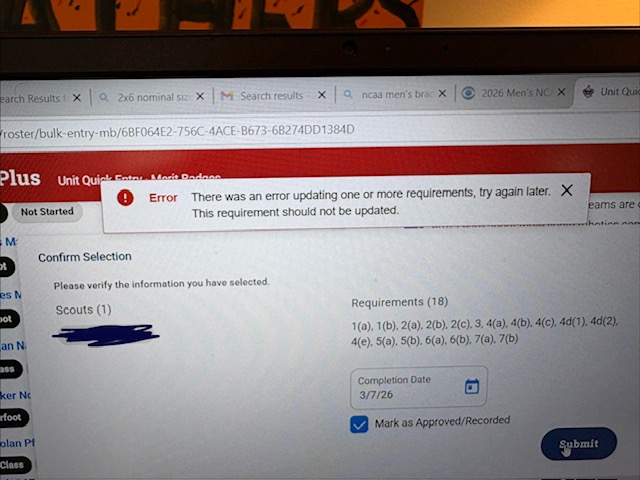
@PatriciaHannel so is this on every scout? Every requirement? Is it only with Quick Entry like here? I Assume this is T920B?
Yes, every scout, almost every merit badge and rank advancement. I occasionally, but rarely, get the green message saying that the advancement has been successfully recorded. Most times, I get the error message.
@PatriciaHannel on first test staff is not seeing this - can you give a specific Scout Member # and exact item you are trying to enter to get this error?
NOTE: I would also try an Incognito window to see if it is something in your cache.
I just entered a merit badge using a “New InPrivate Window” in Microsoft Edge and it worked just fine. I also entered a bunch of merit badges in the regular window and got the error message each time. Various scouts, various merit badges, entered one at a time.
@PatriciaHannel - i would clear the cache and cookies in your browser for scouting.org sites as the private window works
Or it is maybe a pop up extension or some other extension you have turned on your browser
@DonovanMcNeil - very true.. or any combination..


