For some reason our Webelos Den Leaders in Scoutbook Legacy did not migrate over to the “Den Leader” section of Permissions Manager. When I try to add the missing leaders, I get this error. The person I am trying to add, #14170361, has the DL position and is renewed through 12/31/2026. Any ideas?
UPDATE: When I checked the Position Manager in my.scouting.org (I am a Key 3 Delegate), I noticed that none of the Webelos Den Leaders moved over to Den Leader role in SB+. Hope this helps.
@ShirleyHou
Please post the Scouting America Member ID (no names) for all of the leaders that still have Webelos Den Leader positions.
The MID you posted 14170361, is registered as a Den Leader and is in your screen shot. If you have others, please post their MIDs.
Listing all our DLs in our myScouting roster who should be a Den Leader in SB+
Paul 13708961
Stephen 140386568
Peter 14170361
Amy 140680785
Angela 140815943
Lolita 12807985
Meredith 14413705
Hilary 14121671
John 13417714 (listed as both DL and Assistant DL. He should be just Assistant DL but I cannot remove him from the position in MyScouting, which may be moot with all now being in SB+. Just calling out the discrepancy between rosters)
Thanks!
Hi Ed,
As of Nov 14th 9:20 AM Central Time, I see all the above DLs in the correct spot in SB+ Permissions Manager except John 13417714 who appears both as DL and ADL. When I delete him in SB+ from Den Leader, I get the error that “John needs a registered role” even though he is listed in the Assistant DL box.
Is this an error you can help fix and put him only as ADL?
13708961 - is registered in 2 positions in the same unit - that is wrong - talk to council
all the rest are fine
13417714 if you are seeing this it is your Cache - clear the cache
Thank you! And I reached out to my council to fix the person with 2 registered for positions.
Just to confirm, it fixed the issue?
@DonovanMcNeil I have this same issue for myself. Scoutbook+ has me as ADL and DL. If I remove myself from one list, the dropdowns have a yellow triangle next to me name indicating I’m not assigned to a role.
I can’t save after that – web page pops up and says “The following users do not have a registered position anymore. Please assign them to a registered position (me listed)” . Then if I try to add myself back to a second role, it says “The user has too many registered positions, remove them before trying to assign this new position”
Is this actually a council issue? I emailed them the other day about me being doubled on there and they replied back “You can have one main registration and the others would be multiple. You can keep all of them on your profile if you want to. You just have to pick which is the Primary.” so I don’t think they understood the problem. I’ll go back to them again if I must, but it might be a challenge to explain my issue. Member ID 135729474
@NathanGreer the Den LEader position has been troublesome - let me see about yours.
@NathanGreer might try a Hard Refresh (Shift + Refresh Page) or an incognito window to see if you still see that.
This is true as long as it’s in different units. Only the COR can be multiply-registered in the same unit, and only as CC or a committee position.
1 Like
Right, and I am multipled to a troop. Primary registration is the pack. And that seems like what they are referring to, but Scoutbook+ has me in multiple registered positions in the same pack unit, which is the problem I’m trying to solve.
I tried both shift-refresh and incognito. Still have two positions, DL and ADL. Same issue if I try to remove one and save. And to be clear, this is in Scoutbook+ Permissions Manager, Assignees tab.
Ah. I misunderstood, and thought whoever had responded to you at council had been talking about the DL and ADL positions in the same unit. Didn’t realize they were referring to positions in another unit.
It kinda sounds like they’re not seeing both the DL and ADL positions on their end. I had understood that the changes were synchronizing between SB+ and my.scouting.
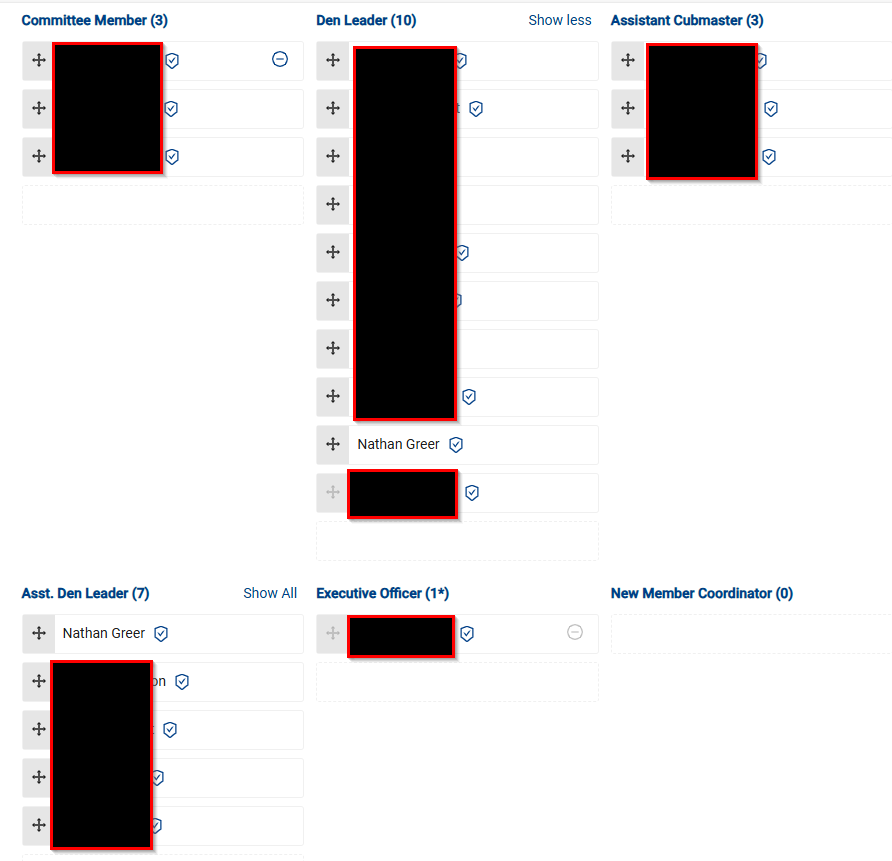
Here’s a little more. I deleted myself from both DL and ADL. Then tried to add back just one position and save it. Didn’t work. And it’s not a duplicate of me – I added myself to ADL and there is not a different one of me in the list to add again (see image). It recognizes I have already been added to the position. I still can’t save with it like this, since it pops up and says I’m not in a position and need to be added to one.
Hrm. I’m guessing you’re also one of the Key 3 Delegates for the troop, since you can see the list. Based on that, it seems like it should be working to remove both, then re-add one.
Did you say whether you see both DL and ADL in my.scouting for yourself? I couldn’t tell from the posts whether it was only appearing in SB+ or also showing up in my.scouting that way.
I’m temporarily a key 3 delegate to help sort through the permissions change.
My.scouting - Position Manager has me in DL and ADL as well. If I try to drag one of me somewhere else, it says “This member is already assigned to two registered positions in this unit. Unassign one of the positions before assigning them to another position.“ But there is no way for me to unassign - no minus button or anything. I can only drag my names around. Same message for trying to drag each of my names somewhere else.
If it helps, the roster view: