
Any idea when this will actually be fixed? I’m still getting the 403 error for brand new detailed assessments that I just created last night. And yes I did clear the cache and also tried an incognito window in chrome AND a different browser (both firefox and edge) and still get the same result.

Robert -
I have reported this to the BSA IT group.
YiCS,
Ron
1 Like
@RobertBrodner What unit is this detailed assessment for?
Pack 0754, scheduled for 2/27/2024
This still does not work. Still get a 403 error if you try to open the link embedded in the system-generated email. Therefore neither the Key 3 of the unit being assessed, nor the Commissioner who initiated the assessment can access the instruments of the assessment. As it is it is useless.
@KennethBean it was working, but something has happened. BSA IT is working on it now.
@KennethBean & @RobertBrodner are these from the email link, or going through Commissioner Tools?
From the email link. I can open the assessment in Commissioner Tools, but I cannot enter any data, which I am guessing is because this is scheduled for a future date.
Okay - I have updated them that the issue is with the email link. They are researching now.
1 Like
I initiate the assessment in Commissioner Tools. It sends an email to the recipients (Key 3). They receive the email from the system but the URL in that email does not work, so they cannot access the assessment to enter their comments.
The correction for this issue has been pushed to production. Pleae make sure you clear your browser’s cache. You may need to “reschedule” your detailed assessments just to make sure a new email is sent to everyone with the updated links.
Thanks! I’ll give it overnight and try it tomorrow.
This appears to still have problems (or a related problem uncovered). Using Commissioner Tools I set up a collaborative assessment for a unit (P920, Circle Ten Council Iron Horse District). The Key 3 are now able to access the form. In the process, on the assessment initiation
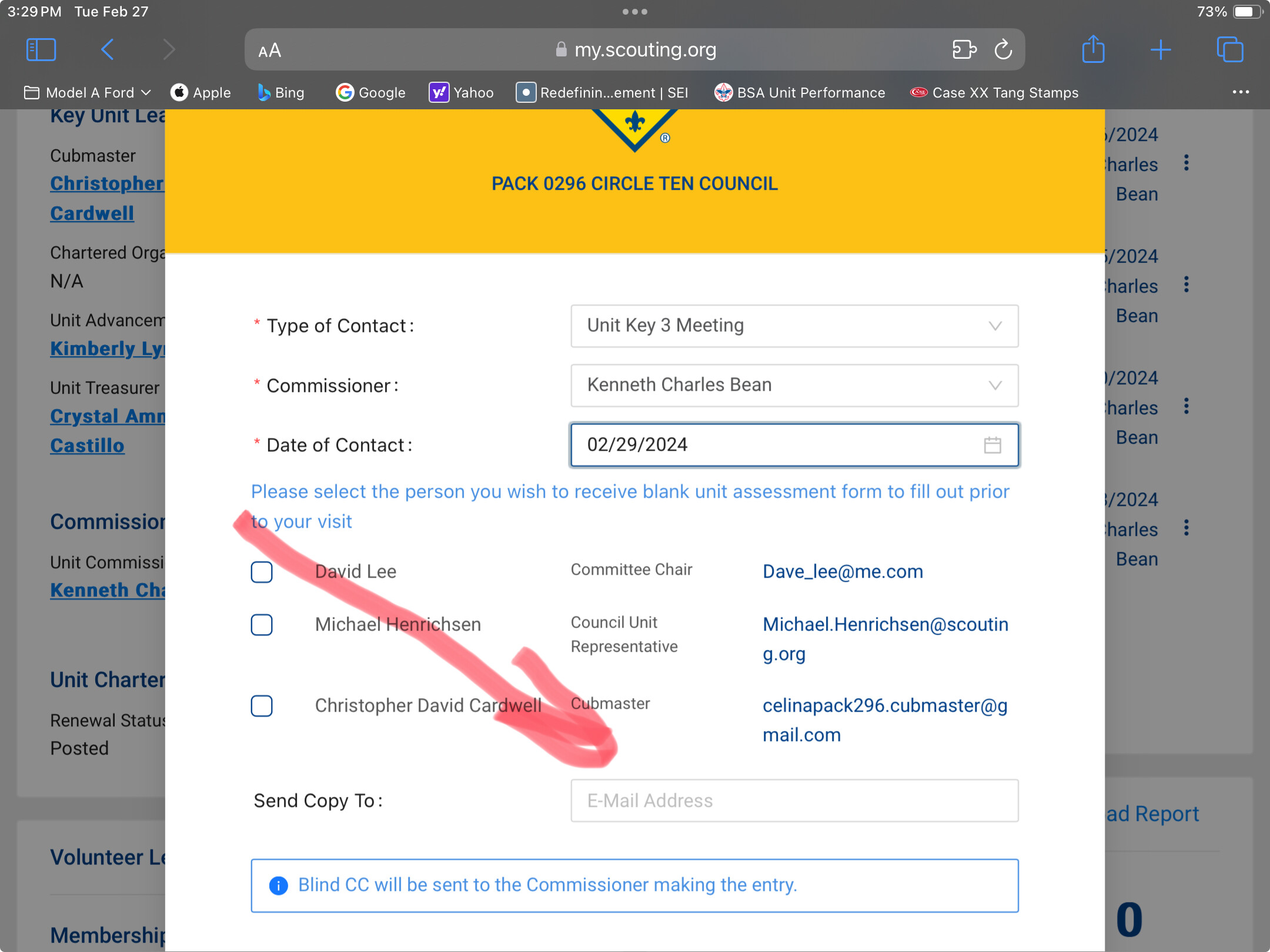
form using the space indicated for additional emails, I also submitted the email address of the unit’s Assistant Cubmaster, inviting him to participate. (There are extenuating circumstances causing me to invite his inputs). He received the system-generated email invitation. The URL in that email takes him to my.scouting as it should, but when he enters his log in credentials he receives the 403 error. My expectation is that anyone that gets the link and has login credentials to my.scouting should be able to access the assessment form and make inputs to it. Otherwise what is the point of being able to add people to the invite?
Only Key 3 and Commissioners can access. The point of the email box is for you to receive a copy, or maybe your ADC, DC as the case may be.
This is an unnecessary limitation especially given the current circumstances of charter orgs (churches) having withdrawn from their chartering status. BSA now has numerous units chartered to councils, with a council professional acting as COR. Because of the number of units that person is responsible for, they cannot know the operational details of all those units and therefore have delegated some of the responsibilities to Scouters or others more closely associated with each unit. Commissioners need the inputs of those “delegates” in the detailed assessment.
Given the current situation every unit does not have a conventional Key 3. In my experience with detailed assessments the COR does not always participate, even in the past environment. Persons who should be involved in a representative collaborative detailed assessment (in addition to the Key 3), should be at the discretion of the commissioner responsible for each unit. I see no reason for anyone selected by the responsible commissioner to not have access to the assessment form.
BTW, the commissioner who initiates a Detailed Assessment automatically receives an email containung the link to the form. There is no need to input your own email address in the email box.
YIS,
Ken
1 Like


