Welcome! This forum has a treasure trove of great info – Scouters helping Scouters! Just a heads up, though - all content, information, and opinions shared on this forum are those of the author, not the BSA.
Up until this past week I have been able to create/edit/mark attendance in the calendar events for the whole pack and individual dens. I am a den Leader, Treasurer, and Pack Admin in Scout book. However, now I can only create/edit/mark attendance for events for only my den.
I am still able to mark advancements and approve advancements and things of that nature. It seems to just be the calendar permissions.
I have a calendar question. Hopefully it is ok for me to piggy back on this thread.
I am scoutmaster for a troop. We don’t use scoutbook plus calendar but would like to with the hope of making it easier for parents and scouts to RSVP for events (such as campouts). Are there any units who are successfully using calendar in this way? I’d love to have confirmation that this actually works.
Today, I created an event for a campout following a YouTube tutorial that I found. I added the rsvp option, added all of the patrols, parents, leaders and saved it. The event is now up on my calendar. My question is, how do I confirm that emails or notifications have been sent? Should I expect to get an email for my own boys in the troop? I haven’t gotten any emails or notifications. I’ve double checked that my personal profile and my own boy profile isn’t opt’ed out of messages.
What are your recommendations? Does anyone have a success story?
I am the Troop Advancement Chair. I am also the Troop Admin. As of today (maybe a few days ago) I cannot Add events to our calendar. I can create Activity Logs, but because I cannot associate them with Events I cannot check attendance. The PDF linked-to up top suggests I should have full rights to Create/Remove/Edit/Approve, but this is not the case. Again - new development. Until recently I had full rights and I am the one who created most of the events on our calendar.
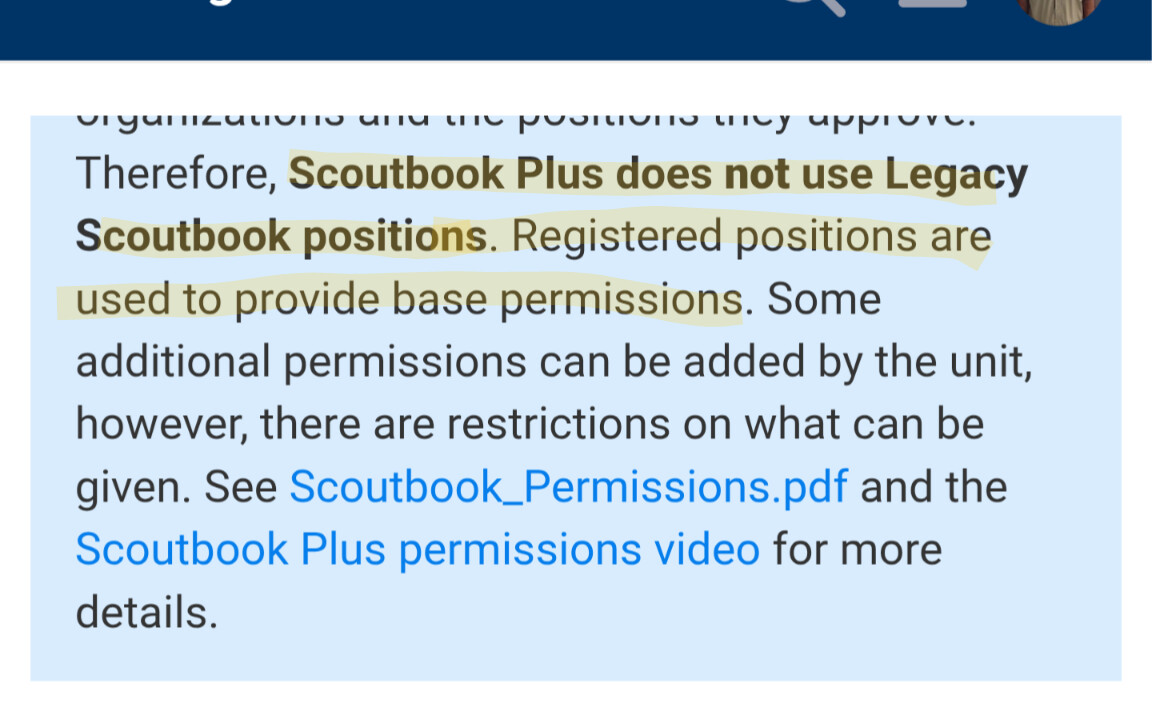
Troop Admin and other positions set in classic Scoutbook are no longer relevant to access. As per the blue banner at the top, permissions are now based on registered positions, and then supplemented based on permissions explicitly granted under the new interface in SB+.
Unit Advancement Chair, even when specified as a functional role in my.scouting/SB+ has fairly limited default permissions, as described in more detail in the linked PDF from the banner. Watch the superscripts in the document carefully, because they describe which permissions are default and which can be added as options, but the superscripts are pretty similar unless you zoom in closely.
Ok, so I see that the superscript leads to the note: “Can Be Given”. By whom?
Honestly, this is a terrible move. As someone up top already stated, I already have a full-time job. In addition as a volunteer I spend hours a week tracking Troop advancement, maintaining advancement records, and ensuring Scouts are recognized for their work. Changes like this are not just a nuisance but totally demoralizing.
Unit Key 3 (SM, CC, or COR) or anyone with the functional role of Key 3 Delegate, for sure. I’m a K3D for my troop, and did all of the “reassignments” in about a half hour. Once you figure out the pattern, it goes pretty quickly.
The national staff determines what development to pursue. I know that there have long been requests for more granular permissions structure so folks don’t have to be assigned to arbitrary positions to do basic things (e.g. assigning an ASM as Committee Secretary in classic Scoutbook to get them calendar editing access).
I’ll just say that the Advancement Chair role is not arbitrary, and maintaining the calendar, which in turn serves to record event participation, camping nights, hiking miles, and service hours (would be nice if they added aquatics hours and riding miles) would seem to be an uncontroversial function that should be granted by default. We don’t have a cadre of dozens of adults in our Troop - a lot of work falls on the handful of committee members and the SM Council. This is yet another add-on that I spent 2 hours trying to figure out last night, and now the SM will need to address in-between the other work he is doing for the Troop. And until he does find the time, I am stuck not being able to enter Eagle project service hours and other such things.
BTW the SM is the only one who will be able to do this because the other K3D have not attempted to use ScoutBook precisely because so much of it is difficult to figure out and unintuitive. Oh, and until recently it was so atrociously slow doing everything on paper was simply more efficient.