Scoutbook Plus & Legacy Out of Sync

Following up on Ghost Den - #22 , I’m still in a bad state in Scoutbook Plus.

I have tried clearing caches, incognito, etc, but one scout, SB User ID: 14382810 / Member ID: 141768205, is just outright missing in Scoutbook Plus.

He is present in the old Scoutbook.

All my dens are also wrong in Scoutbook Plus. I fixed them there at the beginning of the year (moving dens up to the next rank from last year), via Scoutbook Plus. But now Scoutbook Plus has reverted to how it looked at the beginning of the year, but the old Scoutbook has everyone in the correct den.

I expect to have new cubs joining soon, and also want to start getting our advancements entered in the next few weeks, so we will need to figure out how to sort this out.

Possibly related, our pack moved from being a Boys pack to a Boys & Girls pack this year.

When I look at my own 2 boys in the pack via the selector on the top-right of the page, they both show a purple “Boys & Girls” pill next to the unit number.

When I look at the unit overall, though, it still just shows a green “Boys” pill. Is it possible that changing the unit type got things disconnected between old & new scoutbook?

Finally, when I view the roster via a custom report (on my.scouting.org, linked via Scoutbook Plus), it shows all the scouts assigned to the correct dens, including my missing scout.

1 Like

@MichaelKelly4 this is a cache issue 99.9% of time - the scout is in SB+ I see the scout. Have you tried a different browser - one you do not use

I’ve tried an Incognito window frequently for nearly two weeks, usually getting 404 errors or having it otherwise fail to load entirely.

Today I see it working in Incognito, but that’s just a workaround and not a solution.

Additionally, just checking “Disable Cache” in Firefox’s dev tools, then force refreshing the page (ctrl-shift-r) isn’t sufficient to correct the issue; the scout is still missing.

Some further experimentation seems to show that deleting all “Local Storage” for https://advancements.scouting.org is the actual solution. So I expect there is some issue in the application’s JavaScript code with state there being the “source of truth” and getting out of sync with the backend (I saw the APIs like https://api.scouting.org/organizations/v2/units/{unit_uuid}/youths returning all my cubs during this issue). An educated guess is that the PACK_ROSTER_FILTERS could be at play. That particularly has a subUnitFilterTags array that I guess is probably the thing getting out of whack.

1 Like

@MichaelKelly4

Thank you. I have passed this on to the developement team.

I am having similar issues with disconnect between legacy and Scoutbook Plus. Clearing my cache and going incognito has done nothing. Everything in the legacy system looks OK. When I go into Scoutbook plus, the majority of my Dens appear empty and my overall roster is a short one page with about 10 scouts. (I have the view option selected to show them all - expired, eligible, current, so they should all be there) However if I select to edit any of the dens, the pop=up windows will show all of the scouts as available to go into any of the dens, as well as the correct scouts and adults already placed into the den I have chosen to edit. I select to save and it still comes back as 0 members in the den - empty. Any ideas?

@JudyHolcomb

Below the roster is a footer that shows the total number of individuals for the current filter settings, page selectors if more than 1 is needed and the number per page. The default is 10. Click the down arrow to change the max number per page. I typically keep mine set to 100 but have set it to 10 so you can see what it looks like.

image

1 Like

LoL I am actually a “little” insulted that you didn’t think I knew that. Yes it is set to to be able to show as many scouts as I need and if it didn’t I would know how to go to the next page. If I tell it to edit the dens so that it lists the dens, it will show my Lion Den with (0), Tiger Den (0) Bear Den (0), and the other dens with some small number and a list of scouts that is not accurate. However when I select that actual den to get the edit pop up window, then as I said, within the window it shows that all the scouts are actually in that den and that all the scouts that SHOULD be on the full roster are available to go into the den.

@JudyHolcomb

We cannot assume anything when it comes to what people see or don’t see on the screen. We often get questions where the answer is to change a setting on the screen that the user didn’t know was there.

Please try logging in to Scoutbook Plus with a new incognito window. This will tell us if the issue you are having is due to a cache problem.

I have cleared my cache multiple times and also opened in new incognito windows. That doesn’t help at all. I am going to send you screen shots so you can see what it looks like.

[Image removed by sender.]

Ed D’AvignonedavignonScoutbook User Advisory Council
October 9

@JudyHolcomb

We cannot assume anything when it comes to what people see or don’t see on the screen. We often get questions where the answer is to change a setting on the screen that the user didn’t know was there.

Please try logging in to Scoutbook Plus with a new incognito window. This will tell us if the issue you are having is due to a cache problem.

(Moderator: Do not post images with names. I have captured the images and sent to the developers before deleting)

@JudyHolcomb

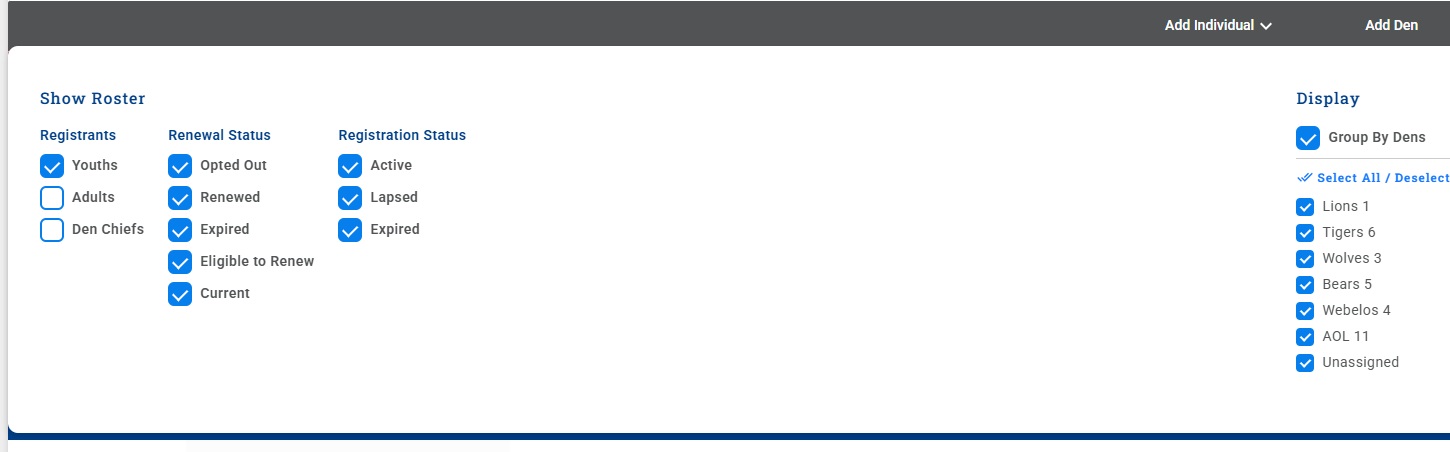
Developers suggest you click the Filter icon on the roster page then click Reset Filters.

Done. No change. And just in case they want to know what filters I have set – I have attached that screen shot. All of the cubs should be showing.

(attachments)

Thanks. I’ll pass that on

One more piece of the puzzle, as I continue to troubleshoot. This all has to be linked to renewal somehow. I checked my roster in my.scouting.org and it only shows those 10 scouts. All ten are Eligible to Renew. Missing are all of the scouts that have already renewed and all of the scouts that just signed up in August and the first part of September (and yes they have already been processed through and were showing up on the roster previously as current). Renewal is not due until the end of the month so the unit should still be current, but perhaps because the chair started renewal it knocked everything out of whack?

@JudyHolcomb

Can you post the Scouting America Member ID (no names) of some of the Scouts that are missing?

Here are all of the scouts missing.

You forgot to include the member numbers.

1 Like

Looking at your my.scouting list there are alot expire 8/31 and 9/30

1 Like

Here are all of the scouts missing.

141043815

141074647

141009139

141120239

141166509

141110553

141129001

141125942

141105160

141256274

141255226

137422118

141248540

14364108

14572198

14572075

141152736

14572156

141305276

140842341

140896563

141727020

141885008

141258750

141896310

141876994

141110580

141863243

140631303

140631365

141818490

140631320

141270753

14676770

141944191

141944205

@JudyHolcomb there are several that you ended their memberships in Scoutbook. I have set up a sync for them all. There are alot that are in Scoutbook and I think it is an issue with your computer. I can setup a screenshare to take a look